Copy sharepoint data to Azure Filez
Copy sharepoint data to Azure Filez
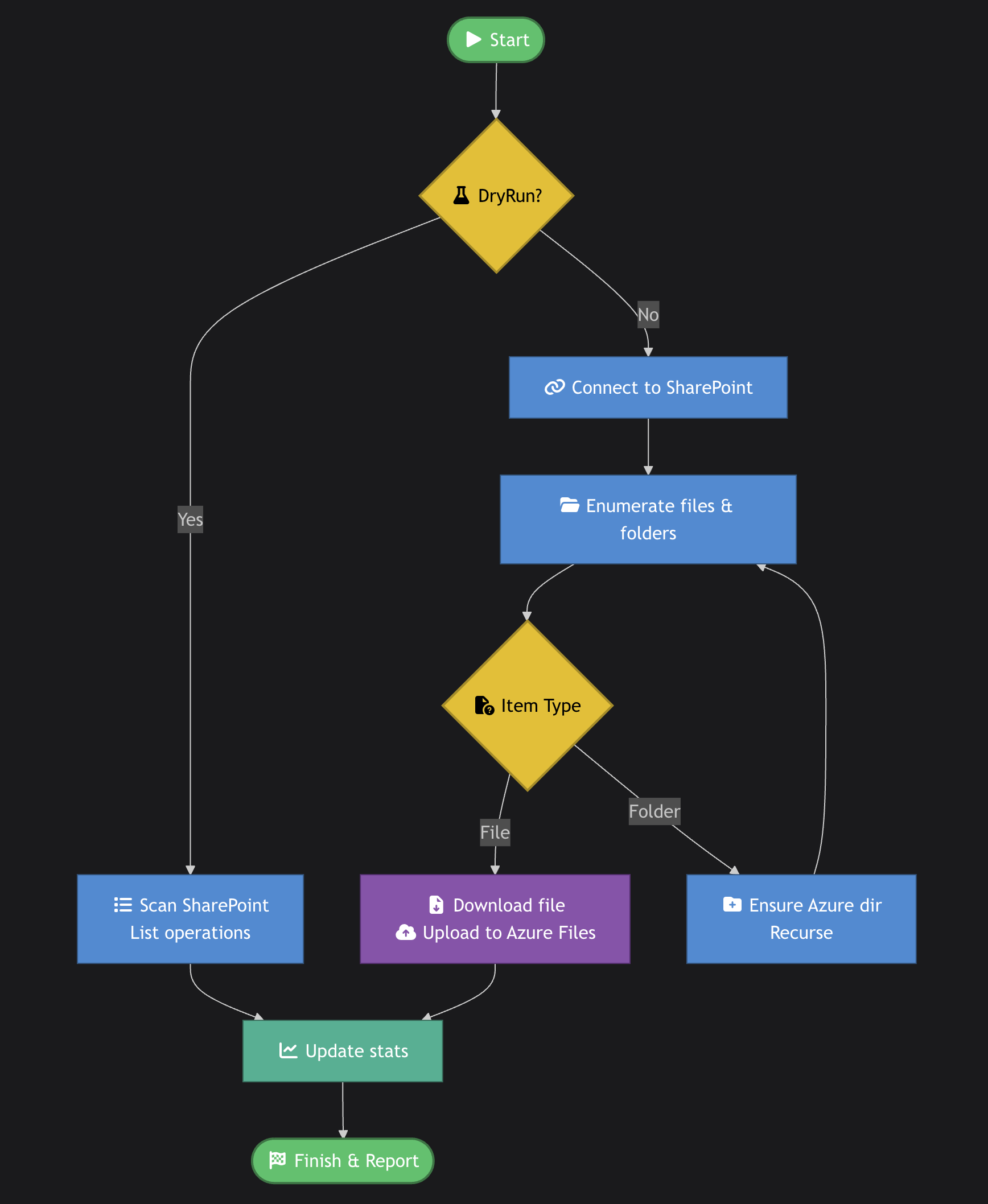
Summary: This PowerShell script copies files and folders from a SharePoint site into an Azure Files share. It supports a -DryRun mode to preview the operations without making changes. The script enumerates folders and files in SharePoint, creates matching directories in Azure Files, downloads files into a temporary location, uploads them into the Azure Files share, and keeps simple statistics about folders and files processed.
How to run (quick)
- Save the full script below as
Copy-SharePoint-to-AzureFiles.ps1. - Edit the Configuration variables near the top of the script (storage account, file share, client ID, etc.).
- Test with a dry run:
1
powershell -ExecutionPolicy Bypass -File .\Copy-SharePoint-to-AzureFiles.ps1 -DryRun
- When the dry run looks good, run the real copy:
1
powershell -ExecutionPolicy Bypass -File .\Copy-SharePoint-to-AzureFiles.ps1
flowchart TD
  A([<i class="fa fa-play"></i> Start])
  B{<i class="fa fa-flask"></i> DryRun?}
  C[<i class="fa fa-list"></i> Scan SharePoint<br/>List operations]
  D[<i class="fa fa-link"></i> Connect to SharePoint]
  E[<i class="fa fa-folder-open"></i> Enumerate files & folders]
  F{<i class="fa fa-file-circle-question"></i> Item Type}
  G[<i class="fa fa-file-arrow-down"></i> Download file<br/><i class="fa fa-cloud-arrow-up"></i> Upload to Azure Files]
  H[<i class="fa fa-folder-plus"></i> Ensure Azure dir<br/>Recurse]
  I[<i class="fa fa-chart-line"></i> Update stats]
  J([<i class="fa fa-flag-checkered"></i> Finish & Report])

  A --> B
  B -- Yes --> C
  B -- No --> D
  D --> E
  E --> F
  F -- File --> G
  F -- Folder --> H
  H --> E
  G --> I
  C --> I
  I --> J

  %% Styles
  classDef startEnd fill:#2ecc71,color:#fff,stroke:#1e8449,stroke-width:2px
  classDef decision fill:#f1c40f,color:#000,stroke:#b7950b,stroke-width:2px
  classDef process fill:#3498db,color:#fff,stroke:#21618c
  classDef io fill:#9b59b6,color:#fff,stroke:#6c3483
  classDef stats fill:#1abc9c,color:#fff,stroke:#117a65

  class A,J startEnd
  class B,F decision
  class C,D,E,H process
  class G io
  class I stats
Full script — PowerShell
1
2
3
4
5
6
7
8
9
10
11
12
13
14
15
16
17
18
19
20
21
22
23
24
25
26
27
28
29
30
31
32
33
34
35
36
37
38
39
40
41
42
43
44
45
46
47
48
49
50
51
52
53
54
55
56
57
58
59
60
61
62
63
64
65
66
67
68
69
70
71
72
73
74
75
76
77
78
79
80
81
82
83
84
85
86
87
88
89
90
91
92
93
94
95
96
97
98
99
100
101
102
103
104
105
106
107
108
109
110
111
112
113
114
115
116
117
118
119
120
121
122
123
124
125
126
127
128
129
130
131
132
133
134
135
136
137
138
139
140
141
142
143
144
145
146
147
148
149
150
151
152
153
154
155
156
157
158
159
160
161
162
163
164
165
166
167
168
169
170
171
172
173
174
175
176
177
178
179
180
181
182
183
184
185
186
187
188
189
190
191
192
193
194
195
196
197
198
199
200
201
202
203
204
205
206
207
208
209
210
211
212
213
214
215
216
217
218
219
220
221
222
223
224
225
226
227
228
229
230
231
232
233
234
235
236
237
238
239
240
241
242
243
244
245
246
247
248
249
250
251
252
253
254
255
256
257
258
259
260
261
262
263
264
265
266
267
268
269
270
271
272
273
274
275
276
277
278
279
280
281
282
283
284
285
286
287
288
289
290
291
292
293
294
295
296
297
298
299
300
301
302
303
304
305
306
307
308
309
310
<#
.SYNOPSIS
    Copy files from SharePoint site to Azure Files with automatic folder creation
.PARAMETER DryRun
    When specified, the script will only list what would be copied without actually copying anything
.EXAMPLE
    .\Copy-SharePoint-to-AzureFiles.ps1 -DryRun
    Run in dry run mode to preview all operations
.EXAMPLE
    .\Copy-SharePoint-to-AzureFiles.ps1
    Execute the actual copy operation
#>

param(
    [switch]$DryRun
)

# Global statistics
$script:Stats = @{
    FoldersToCreate = 0
    FilesToCopy = 0
    TotalSize = 0
    FoldersList = @()
    FilesList = @()
}

# Configuration - SharePoint Source
$SourceSiteUrl = "https://xxxx.sharepoint.com/sites/xxxx"
$ClientId = "xxxxxxxx-xxxxx-xxxx"
$UseInteractiveLogin = $true # Set to $true to use Interactive login (recommended for Global Admin)
$SourceLibrary = "" # Empty - folders are at site root level
$SourceRootFolder = "" # Empty because the site URL already points to folder_structure
$SubFolders = @("xxxxx", "xxxxx", "xxxx", "xxxxx", "xxxxx")

# Configuration - Azure Files Destination
$StorageAccountName = "xx"  # Change this
$FileShareName = "xx"            # Change this
$StorageAccountKey = "xxx"     # Change this or use connection string
$DestinationRootFolder = "xxxxx" # Root folder in Azure Files

# Temporary download location
$TempDownloadPath = "$env:TEMP\SharePointToAzureFiles"

# Function to ensure Azure Files directory exists
function Initialize-AzureFilesDirectory {
    param(
        [Parameter(Mandatory = $true)]
        [string]$DirectoryPath,
        [Parameter(Mandatory = $true)]
        $Context,
        [switch]$DryRun
    )

    if ($DryRun) {
        Write-Host "[DRY RUN] Would check/create directory: $DirectoryPath" -ForegroundColor Cyan
        return
    }

    $pathParts = $DirectoryPath.Trim('/').Split('/')
    $currentPath = ""

    foreach ($part in $pathParts) {
        if ($currentPath -eq "") {
            $currentPath = $part
        } else {
            $currentPath = "$currentPath/$part"
        }

        # Check if directory exists
        $dir = Get-AzStorageFile -ShareName $FileShareName -Path $currentPath -Context $Context -ErrorAction SilentlyContinue

        if ($null -eq $dir) {
            Write-Host "Creating directory: $currentPath" -ForegroundColor Yellow
            try {
                $parentPath = if ($currentPath.Contains('/')) {
                    $currentPath.Substring(0, $currentPath.LastIndexOf('/'))
                } else {
                    $null
                }

                if ($parentPath) {
                    New-AzStorageDirectory -ShareName $FileShareName -Path $currentPath -Context $Context -ErrorAction Stop | Out-Null
                } else {
                    New-AzStorageDirectory -ShareName $FileShareName -Path $part -Context $Context -ErrorAction Stop | Out-Null
                }

                Write-Host "Created directory: $currentPath" -ForegroundColor Green
            }
            catch {
                Write-Host "Error creating directory $currentPath : $_" -ForegroundColor Red
            }
        }
    }
}

# Function to download and upload files recursively
function Copy-FilesRecursively {
    param(
        [Parameter(Mandatory = $true)]
        [string]$SourcePath,
        [Parameter(Mandatory = $true)]
        [string]$DestinationPath,
        [Parameter(Mandatory = $false)]
        $AzureContext,
        [switch]$DryRun
    )

    if ($DryRun) {
        Write-Host "`n[DRY RUN] Scanning folder: $SourcePath" -ForegroundColor Magenta
    } else {
        Write-Host "`nProcessing folder: $SourcePath" -ForegroundColor Magenta
    }

    # Debug: Show the exact path being accessed
    $fullPath = if ($SourceLibrary -eq "") { $SourcePath } else { "$SourceLibrary/$SourcePath" }
    Write-Host "Debug: Attempting to access: $fullPath" -ForegroundColor Gray

    # Get all items in the current folder from SharePoint
    try {
        if ($SourceLibrary -eq "") {
            $items = Get-PnPFolderItem -FolderSiteRelativeUrl $SourcePath -ItemType All -ErrorAction Stop
        } else {
            $items = Get-PnPFolderItem -FolderSiteRelativeUrl "$SourceLibrary/$SourcePath" -ItemType All -ErrorAction Stop
        }
    }
    catch {
        Write-Host "Error accessing folder $SourcePath : $($_.Exception.Message)" -ForegroundColor Red
        return
    }

    if ($null -eq $items) {
        Write-Host "No items found in: $SourcePath" -ForegroundColor Yellow
        return
    }

    # Process files
    foreach ($file in $items | Where-Object { $_.GetType().Name -eq "File" }) {
        $fileSize = [math]::Round($file.Length / 1MB, 2)

        if ($DryRun) {
            Write-Host "[DRY RUN] Would copy file: $($file.Name) (Size: $fileSize MB)" -ForegroundColor White
            $script:Stats.FilesToCopy++
            $script:Stats.TotalSize += $file.Length
            $script:Stats.FilesList += [PSCustomObject]@{
                Name = $file.Name
                Source = "$SourcePath/$($file.Name)"
                Destination = "$DestinationPath/$($file.Name)"
                Size = $fileSize
            }
        } else {
            Write-Host "Copying file: $($file.Name) (Size: $fileSize MB)" -ForegroundColor White

            try {
                # Download file from SharePoint to temp location
                $tempFilePath = Join-Path $TempDownloadPath $file.Name
                $fileUrl = if ($SourceLibrary -eq "") { "$SourcePath/$($file.Name)" } else { "$SourceLibrary/$SourcePath/$($file.Name)" }
                Get-PnPFile -Url $fileUrl -AsFile -Path $TempDownloadPath -Filename $file.Name -Force -ErrorAction Stop | Out-Null

                # Upload to Azure Files
                Set-AzStorageFileContent -ShareName $FileShareName -Source $tempFilePath -Path "$DestinationPath/$($file.Name)" -Context $AzureContext -Force -ErrorAction Stop | Out-Null

                # Clean up temp file
                Remove-Item $tempFilePath -Force -ErrorAction SilentlyContinue

                Write-Host "Successfully copied: $($file.Name)" -ForegroundColor Green
            }
            catch {
                Write-Host "Error copying file $($file.Name): $_" -ForegroundColor Red
            }
        }
    }

    # Process subfolders recursively
    foreach ($folder in $items | Where-Object { $_.GetType().Name -eq "Folder" }) {
        $newSourcePath = "$SourcePath/$($folder.Name)"
        $newDestinationPath = "$DestinationPath/$($folder.Name)"

        if (-not $DryRun) {
            # Ensure Azure Files directory exists
            Initialize-AzureFilesDirectory -DirectoryPath $newDestinationPath -Context $AzureContext
        } else {
            $script:Stats.FoldersToCreate++
            if ($newDestinationPath -notin $script:Stats.FoldersList) {
                $script:Stats.FoldersList += $newDestinationPath
            }
        }

        Copy-FilesRecursively -SourcePath $newSourcePath -DestinationPath $newDestinationPath -AzureContext $AzureContext -DryRun:$DryRun
    }
}

# Main script execution
try {
    if ($DryRun) {
        Write-Host "`n========================================" -ForegroundColor Yellow
        Write-Host "DRY RUN MODE - No changes will be made" -ForegroundColor Yellow
        Write-Host "========================================`n" -ForegroundColor Yellow
    }

    Write-Host "Starting copy process..." -ForegroundColor Cyan
    Write-Host "Source: $SourceSiteUrl" -ForegroundColor Cyan
    Write-Host "Destination: Azure Files - $StorageAccountName/$FileShareName" -ForegroundColor Cyan

    # Connect to SharePoint
    Write-Host "`nConnecting to SharePoint source site..." -ForegroundColor Yellow
    Write-Host "A browser window will open for authentication..." -ForegroundColor Cyan
    try {
        if ($UseInteractiveLogin) {
            # Use Interactive login (browser-based authentication)
            Connect-PnPOnline -Url $SourceSiteUrl -ClientId $ClientId -ErrorAction Stop
        } else {
            Connect-PnPOnline -Url $SourceSiteUrl -ClientId $ClientId -ErrorAction Stop
        }
        Write-Host "Connected to SharePoint successfully" -ForegroundColor Green
    }
    catch {
        Write-Host "Failed to connect to SharePoint: $($_.Exception.Message)" -ForegroundColor Red
        Write-Host "Make sure pop-ups are allowed in your browser" -ForegroundColor Yellow
        throw
    }

    # Connect to Azure Storage (only for actual copy, not dry run)
    if (-not $DryRun) {
        Write-Host "`nConnecting to Azure Storage..." -ForegroundColor Yellow
        $azureContext = New-AzStorageContext -StorageAccountName $StorageAccountName -StorageAccountKey $StorageAccountKey
        Write-Host "Connected to Azure Storage successfully" -ForegroundColor Green

        # Ensure temp download directory exists
        if (-not (Test-Path $TempDownloadPath)) {
            New-Item -ItemType Directory -Path $TempDownloadPath -Force | Out-Null
        }
    } else {
        $azureContext = $null
    }

    # Process each subfolder
    foreach ($subFolder in $SubFolders) {
        Write-Host "`n========================================" -ForegroundColor Cyan
        Write-Host "Processing subfolder: $subFolder" -ForegroundColor Cyan
        Write-Host "========================================" -ForegroundColor Cyan

        # Build paths
        $sourcePath = if ($SourceRootFolder -eq "") { $subFolder } else { "$SourceRootFolder/$subFolder" }
        $destinationPath = if ($DestinationRootFolder -eq "") { $subFolder } else { "$DestinationRootFolder/$subFolder" }

        # Ensure root destination folder exists (only for non-dry run)
        if (-not $DryRun) {
            Initialize-AzureFilesDirectory -DirectoryPath $destinationPath -Context $azureContext
        }

        # Start recursive processing
        if ($DryRun) {
            Copy-FilesRecursively -SourcePath $sourcePath -DestinationPath $destinationPath -AzureContext $azureContext -DryRun
        } else {
            Copy-FilesRecursively -SourcePath $sourcePath -DestinationPath $destinationPath -AzureContext $azureContext
        }
    }

    if ($DryRun) {
        # Display summary statistics
        Write-Host "`n========================================" -ForegroundColor Yellow
        Write-Host "DRY RUN SUMMARY" -ForegroundColor Yellow
        Write-Host "========================================" -ForegroundColor Yellow
        Write-Host "Total folders to create: $($script:Stats.FoldersToCreate)" -ForegroundColor Cyan
        Write-Host "Total files to copy: $($script:Stats.FilesToCopy)" -ForegroundColor Cyan
        $totalSizeGB = [math]::Round($script:Stats.TotalSize / 1GB, 2)
        $totalSizeMB = [math]::Round($script:Stats.TotalSize / 1MB, 2)
        Write-Host "Total size to copy: $totalSizeMB MB ($totalSizeGB GB)" -ForegroundColor Cyan

        Write-Host "`n--- Folders to be created ---" -ForegroundColor Yellow
        if ($script:Stats.FoldersList.Count -gt 0) {
            $script:Stats.FoldersList | ForEach-Object { Write-Host "  + $_" -ForegroundColor DarkYellow }
        } else {
            Write-Host "  (No new folders needed)" -ForegroundColor Gray
        }

        Write-Host "`n--- Files to be copied ---" -ForegroundColor Yellow
        if ($script:Stats.FilesList.Count -gt 0) {
            $script:Stats.FilesList | ForEach-Object {
                Write-Host "  $($_.Name)" -ForegroundColor White
                Write-Host "    From: $($_.Source)" -ForegroundColor Gray
                Write-Host "    To:   $($_.Destination)" -ForegroundColor Gray
                Write-Host "    Size: $($_.Size) MB" -ForegroundColor Gray
            }
        } else {
            Write-Host "  (No files to copy)" -ForegroundColor Gray
        }

        Write-Host "`n========================================" -ForegroundColor Green
        Write-Host "DRY RUN COMPLETED - Ready to execute" -ForegroundColor Green
        Write-Host "Run without -DryRun to perform actual copy" -ForegroundColor Green
        Write-Host "========================================" -ForegroundColor Green
    } else {
        # Clean up temp directory
        if (Test-Path $TempDownloadPath) {
            Remove-Item $TempDownloadPath -Recurse -Force -ErrorAction SilentlyContinue
        }

        Write-Host "`n========================================" -ForegroundColor Green
        Write-Host "Copy process completed!" -ForegroundColor Green
        Write-Host "========================================" -ForegroundColor Green
    }
}
catch {
    Write-Host "Error in main execution: $_" -ForegroundColor Red
    Write-Host $_.Exception.Message -ForegroundColor Red
}
finally {
    Disconnect-PnPOnline -ErrorAction SilentlyContinue
}
This post is licensed under
CC BY 4.0
by the author.